
MindManager Review:
In today’s fast-moving digital world, ideas alone are not enough—you need a clear system to organise, plan, and execute them. That’s exactly where MindManager shines. Designed for professionals, teams, and businesses, MindManager helps transform scattered thoughts into structured plans using mind maps, flowcharts, dynamic diagrams, and Gantt charts. (mindmanager.com)
Whether you’re brainstorming a business strategy, planning a project, or collaborating with your team, MindManager provides a visual environment that makes complex information easier to understand and manage.
In this article, we’ll explore what MindManager is, its key features, benefits, integrations, and why it has become a popular productivity and project management tool.

What is MindManager?
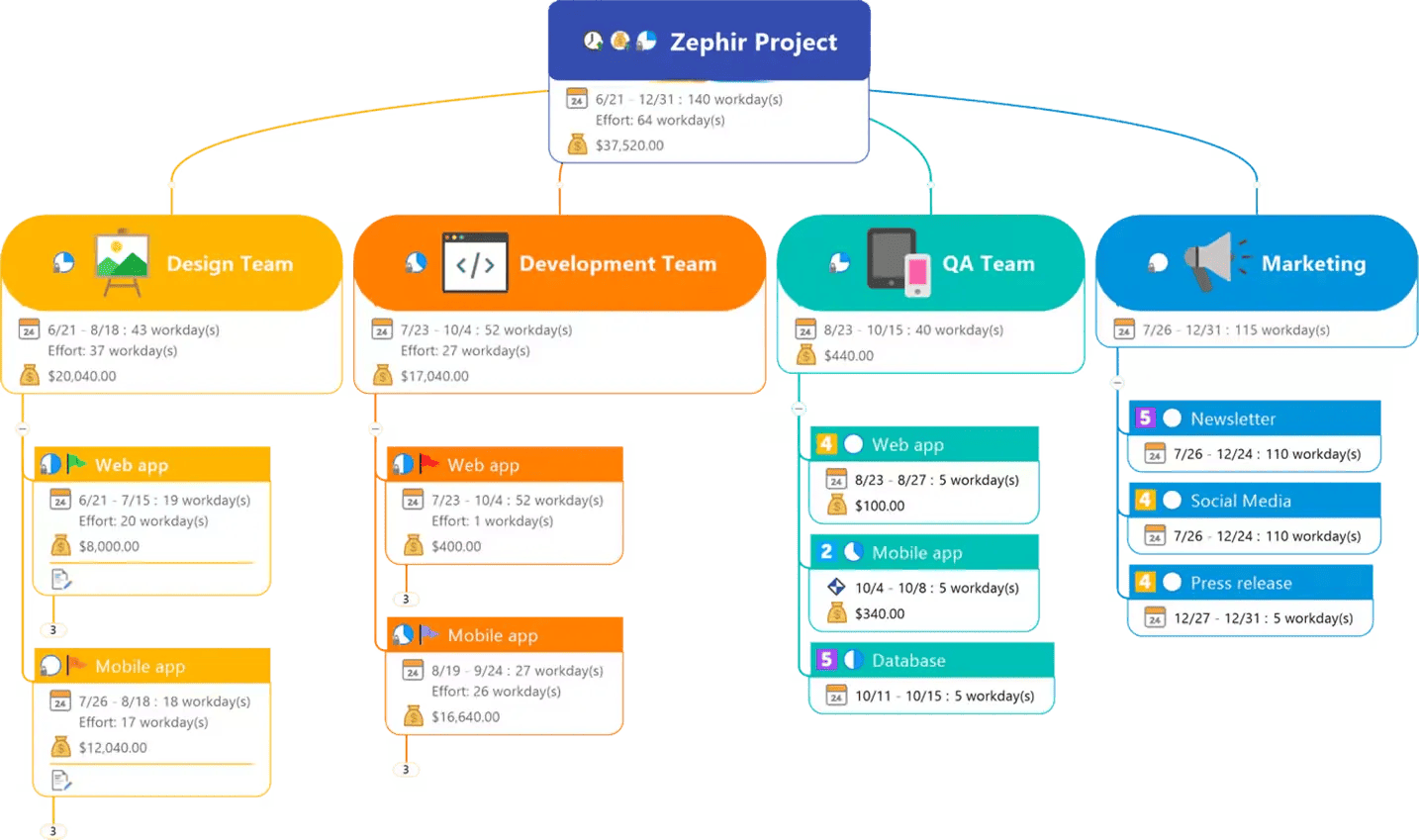
MindManager is a visual productivity and project-planning software that allows individuals and teams to organize ideas, manage information, and execute projects through dynamic visual maps and diagrams. (software.eu)
Instead of dealing with long lists or scattered notes, MindManager converts information into structured visual maps that show relationships between ideas, tasks, and workflows. This approach helps users understand complex projects quickly and make better decisions. (Software Advice)
The software supports multiple diagram types such as:
- Mind Maps
- Flowcharts
- Concept Maps
- Timelines
- Gantt Charts
- Organizational Charts
These tools allow you to move from brainstorming to execution seamlessly, making MindManager a powerful solution for both individuals and organizations. (mindmanager.com)
Key Features of MindManager
1. Powerful Mind Mapping for Brainstorming
Mind mapping is the core feature of MindManager. It allows users to visually capture ideas and structure them intuitively.
Instead of writing notes line by line, you create a central topic and expand branches into related ideas. This visual format makes brainstorming sessions more productive and easier to understand.
Benefits include:
- Faster idea generation
- Clear visual organization
- Better understanding of relationships between concepts
- Simplified decision-making
Many businesses use mind maps for strategic planning, product development, and research organization. (MindManager Blog)
2. Dynamic Visual Diagrams and Flowcharts
MindManager lets you create professional-looking diagrams and flowcharts that represent processes, systems, or workflows.
Flowcharts are particularly useful for:
- Business process mapping
- Workflow visualization
- Training documentation
- Process optimization
With drag-and-drop functionality and customizable templates, users can quickly build diagrams that clarify complex systems and processes.
3. Project Planning with Gantt Charts
One of MindManager’s standout features is its Gantt chart capability, which lets users visually manage projects and track timelines.
With Gantt charts, you can:
- Track project milestones
- Manage deadlines
- Assign tasks to team members
- Monitor dependencies between tasks
This helps teams stay aligned and ensures projects move from planning to execution without confusion.
4. Task Management and Workflow Organisation
MindManager is not just about ideas—it’s about action.
Users can convert topics in a mind map into tasks with priorities, deadlines, and progress tracking. This means brainstorming sessions can instantly become executable project plans.
Features include:
- Task assignment
- Priority tracking
- Progress indicators
- Resource allocation
This makes it an excellent tool for project managers, entrepreneurs, and team leaders.
5. Real-Time Collaboration for Teams
MindManager supports collaboration features that allow teams to co-edit maps, share ideas, and manage projects together.
Teams can collaborate on:
- Strategic planning sessions
- Brainstorming meetings
- Product roadmaps
- Team dashboards
Real-time collaboration ensures everyone stays aligned and informed.
Seamless Integrations with Popular Tools
One of the biggest advantages of MindManager is its integration ecosystem.
The platform integrates with several widely used business tools, including:
- Microsoft Teams
- SharePoint
- Jira
- Microsoft Word
- Microsoft Excel
- Microsoft Outlook
- Microsoft Project
These integrations allow users to pull data directly into their visual maps and manage work without switching between multiple tools. (mindmanager.com)
For example:
- Teams can collaborate on mind maps directly inside Microsoft Teams.
- SharePoint data can be visualized in structured diagrams.
- Jira issues and workflows can be tracked visually.
This connected workflow significantly improves productivity.
How MindManager Improves Productivity
MindManager is designed to reduce complexity and improve clarity. It helps users:
1. Organise Information Efficiently
Large amounts of data can be structured into easy-to-understand visual maps.
2. Improve Decision Making
Visual relationships between ideas make it easier to analyse problems and opportunities.
3. Boost Team Collaboration
Shared maps and diagrams improve communication among team members.
4. Accelerate Project Execution
Tasks can be assigned directly from brainstorming sessions.
Who Should Use MindManager?
MindManager is suitable for a wide range of professionals and industries.
Entrepreneurs and Startups
Use it for business planning, strategy maps, and idea generation.
Project Managers
Plan projects, track progress, and manage timelines with Gantt charts.
Marketing Teams
Organise campaigns, content strategies, and product launches.
Students and Educators
Structure research, learning materials, and presentations.
Corporate Teams
Manage workflows, collaborate on ideas, and track large projects.
Advantages of MindManager
Here are some of the major benefits of using MindManager:
✔ Visual thinking improves clarity
✔ Combines brainstorming with project execution
✔ Powerful integrations with Microsoft tools
✔ Multiple diagram types in one platform
✔ Collaboration features for teams
✔ Professional templates and customization
Because of these capabilities, MindManager is widely used for strategic planning, project management, and knowledge organization.
Why MindManager Stands Out
There are many mind mapping tools available today, but MindManager stands out because it goes beyond brainstorming.
Most tools stop at idea visualization. MindManager goes further by enabling the following:
- Task execution
- Project tracking
- Team collaboration
- Enterprise integrations
This makes it a complete visual productivity platform rather than just a brainstorming tool.
FAQs About MindManager
What is MindManager used for?
MindManager is used for brainstorming, project planning, task management, and organising complex information using visual maps and diagrams.
Does MindManager support project management?
Yes. MindManager includes project planning features such as Gantt charts, task assignments, deadlines, and progress tracking.
Can teams collaborate using MindManager?
Yes. Teams can co-edit maps, share dashboards, and collaborate on projects in real time.
Does MindManager integrate with other software?
Yes. It integrates with tools like Microsoft Teams, SharePoint, Jira, Excel, Outlook, and many other productivity platforms.
Is MindManager suitable for businesses?
Absolutely. MindManager is widely used by businesses for strategic planning, workflow management, and project execution.

500 Motivational Social Media Reels


5000 Social Media Templates

21000 Midjourney Prompts
Final Verdict
If you want a powerful tool that transforms ideas into actionable plans, MindManager is one of the best visual productivity platforms available today.
With its combination of mind maps, flowcharts, Gantt charts, and enterprise integrations, it allows individuals and teams to move seamlessly from brainstorming to execution.
Whether you’re managing a project, planning a strategy, or organising information, MindManager provides the clarity and structure needed to get things done faster and smarter